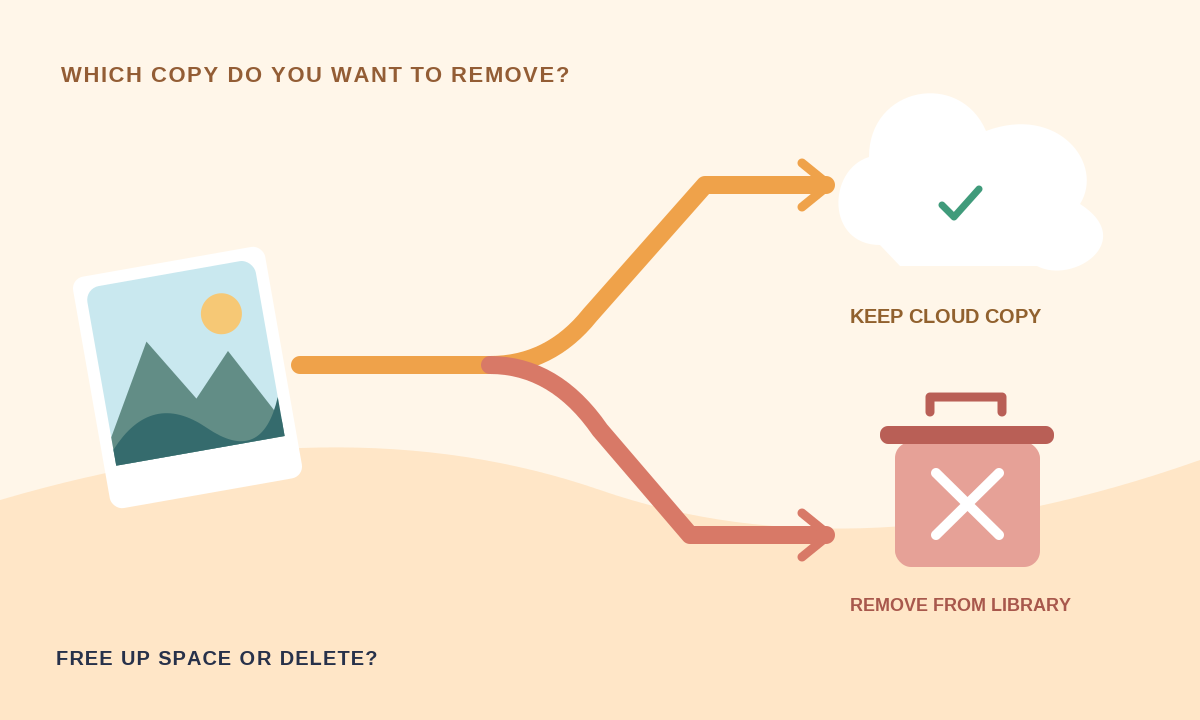
How is Fast Cleaner different from Google Photos Free up space?
Fast Cleaner helps you decide which media you no longer want. Google Photos Free up space removes device copies already backed up to Google Photos. Choose based on whether you want to keep a cloud copy or remove an item from the library.
Google Photos’ “Free up space” feature removes eligible backed-up copies from your device. Deleting from the Google Photos library is a different action. Before confirming either, decide whether you want less local storage use or fewer photos in the library.
The same picture can appear in a phone gallery and a cloud-backed view. That makes it easy to mistake “I can still see it” for “it is still stored here.” Check the copy and the action rather than relying on the thumbnail.
- Verify backup before removing local copies.
- Device cleanup does not mean the cloud account uses less storage.
- A cloud-visible photo may be unavailable in your local gallery or offline.
What “Free up space” is for
Google’s Android instructions describe removing device copies of backed-up photos and videos. Open Google Photos, select your profile picture, and look for Free up space on this device. Read the proposed action before confirming.
The purpose is to recover local room while retaining the cloud library. It is not a duplicate-photo review and does not decide whether you still want each memory.
What library deletion is for
Google’s deletion guidance explains that deleting backed-up items affects the library and can also remove them from devices with backup turned on. Do not use ordinary deletion as a substitute for a local-only cleanup action.
Review the wording of the confirmation screen. If you want a local copy removed but the memory retained, stop when the interface describes removing the library item. Google also documents a separate “Delete from device” action for individual local copies.
| Your goal | What to investigate |
|---|---|
| Keep backed-up memories, use less phone space | Free up space or the appropriate local-only action |
| Remove an unwanted photo from the library | Delete, after reviewing the item and affected copies |
| Use less cloud capacity | Account storage management; local cleanup alone is insufficient |
Check the backup before making the phone copy disappear
Confirm that you are using the intended Google account and that backup has completed for the items involved. Open a few important files through the account you expect to rely on. A pending upload is not the same as a verified copy.
For especially important records, keep another independent copy before a large cleanup. This is also a useful moment to check whether any files have to remain available during travel or work without connectivity.
Try the process on a small, nonessential selection first when the interface supports it. Understanding one file’s outcome is more useful than learning what a bulk action means after confirming it.
What changes after device copies are removed
Google notes that media removed from the device can remain visible in Google Photos while no longer being available through the built-in gallery or offline. Plan for that distinction before a journey or a presentation.
If a picture is visible but takes time to open, do not immediately conclude it is lost. Check your connection, signed-in account, and whether you are viewing a cloud copy.
On iPhone, consult Google’s iOS-specific instructions. Read the additional device-cleanup steps and consider any iCloud Photos sync before removing items from Apple Photos.
Where duplicate review fits
Backing up everything and deciding what is worth keeping are separate jobs. If you have five near-identical pictures but want only two, review them before treating the remaining library as a collection to preserve.
Fast Cleaner can help organize device-media review, including duplicate and similar photos. It is not a control panel for your entire Google account and should not be presented as one.
After cleanup, compare device usage with account usage separately. A successful local cleanup can leave the cloud meter unchanged; that is consistent with its purpose.
You can also download  Fast Cleaner: AI Photo Clean. Review the features available on your platform and any pricing before choosing an app.
Your review checklist
Mark each point after you have considered it. This worksheet records your review; it does not inspect your device.
You have reviewed each point. Proceed only with the changes you understand and want to make.
Your selections stay in this page’s memory, are not submitted, and reset when you reload.
Common questions
Does Free up space delete my Google Photos backup?
Its intended purpose is to remove eligible backed-up device copies while retaining the cloud items. Verify backup and read the confirmation for your platform.
Why are pictures missing from my phone gallery afterward?
The local copies may have been removed. Check the intended Google Photos account and your connection before treating an absent gallery thumbnail as a lost backup.
Will this reduce my Google storage bill?
Removing only device copies does not remove the cloud library. Review account usage and plan eligibility separately.
Three different photo cleanup actions
| Action | Intended result | Check first |
|---|---|---|
| Google Photos Free up space | Remove eligible backed-up device copies. | Backup completion and whether you need offline access. |
| Delete in Google Photos | Remove the photo from the library and affected synced devices. | Which devices and copies will be affected. |
| Review in Fast Cleaner | Choose unwanted local media from cleanup suggestions. | Permissions and your photo service’s deletion behavior. |
Google’s wording:
This feature deletes photos.
Google’s warning refers to device copies. Its guide also explains that removed copies are unavailable in the built-in gallery and while offline.
Platform source: Google — Free up space on your Android device, checked November 21, 2026.

Where Fast Cleaner fits
Fast Cleaner is free on Android under the Google Play name Duplicate Photo Cleaner AI by CrocApps. Use it for deliberate review; use Google Photos’ device-copy removal when keeping a verified cloud version is your goal.
Fast Cleaner’s privacy policy describes on-device media analysis with separate limited analytics. Compare Android and iPhone pricing.
Continue with Are photo cleaner apps safe.
Official platform references are linked beside the relevant claims. Menu labels and available features vary by software version and device. Examples are illustrative; this guide does not claim a measured cleanup result or an endorsement by Apple or Google.